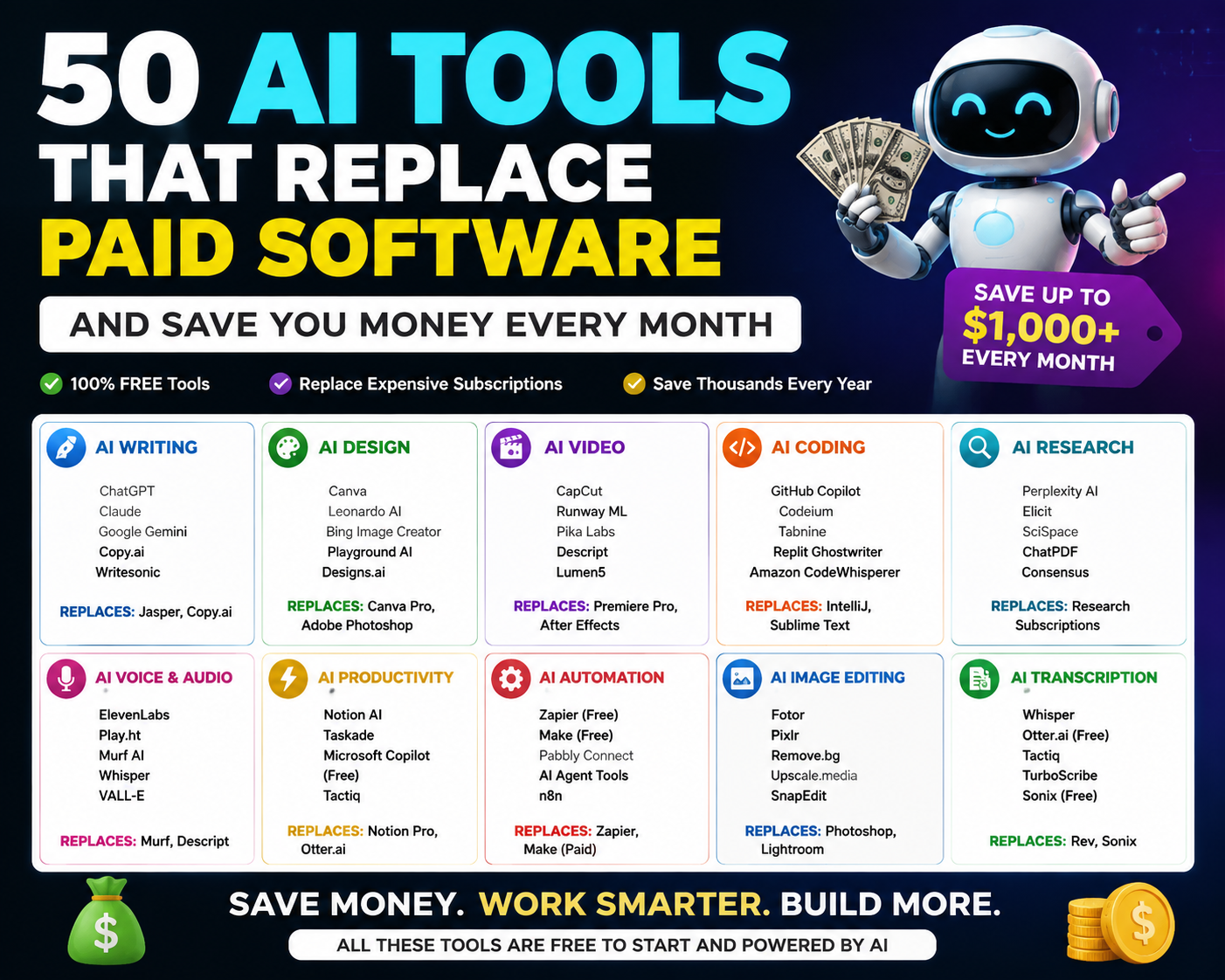
Pricing and free-tier limits checked against official product pages, August 2026. Verify current terms before canceling any paid tool AI pricing changes fast.
Most people don’t realize how much they spend on software until they actually sit down and add it up. A writing assistant here, a design tool there, a video editor, an email platform each one feels small on its own. But stack five or six together and you’re easily past \$100/month before you’ve done any real work.
Free AI tools have gotten capable enough to replace many of these paid subscriptions. Not all of them. Not for every use case. But for a lot of people, the free tier now covers what they actually do day-to-day.
This guide helps you figure out which free AI tools can replace which paid ones and which paid subscriptions are still worth keeping. It’s organized by user type first, so you can jump straight to a recommended stack, then dive into individual tool comparisons if you want more detail.
Pick Your AI Stack: Recommendations by User Type
This is the section most guides skip. Instead of making you read about all 50 tools and build your own stack, here are ready-made combinations based on what you actually do.
Blogger / Content Creator (\$0 Stack)
| Need | Free AI Tool | Replaces |
|---|---|---|
| Writing & drafts | Claude Free or ChatGPT Free | Jasper (\$59/mo) |
| Grammar & editing | Grammarly Free | Grammarly Pro (\$12–\$30/mo) |
| Blog graphics | Canva Free | Canva Pro (\$13/mo) |
| Research | Perplexity AI Free | Paid research tools |
| Email newsletter | Sender Free | Mailchimp (\$13+/mo) |
What you give up: Claude’s free tier has strict hourly message caps, so heavy writing days may require switching between Claude and ChatGPT. Canva Free doesn’t include Brand Kit. Sender includes their branding in your email footer.
Freelancer / Small Agency
| Need | Free AI Tool | Replaces |
|---|---|---|
| Client writing | Claude Free + ChatGPT Free | Jasper or Copy.ai (\$49–\$59/mo) |
| Design deliverables | Canva Free + Recraft (vectors) | Adobe CC (\$70/mo) |
| Video edits | CapCut | Premiere Pro (\$23/mo) |
| Meeting notes | Otter.ai Free (300 min/mo) | Otter Pro (\$17/mo) |
| Client email | Brevo Free | Mailchimp Standard (\$20+/mo) |
What you give up: Check commercial licensing Claude and ChatGPT free tiers generally allow commercial output, but some image generation tools (Leonardo.ai, Krea AI) restrict commercial use on free plans. See the licensing section below.
E-commerce Store Owner
| Need | Free AI Tool | Replaces |
|---|---|---|
| Product descriptions | ChatGPT Free | Jasper or copywriter |
| Product photos | Atelier AI Free | Studio photography (\$200–\$500/shoot) |
| Social graphics | Canva Free | Canva Pro (\$13/mo) |
| Customer service | Tidio Free | Intercom (\$19–\$39/mo) |
| Email marketing | Sender Free | Mailchimp (\$13+/mo) |
What you give up: Atelier AI’s free tier doesn’t add watermarks, which is rare and valuable for product images. Tidio’s free chatbot handles basic questions but you’ll need paid plans for advanced AI responses.
Developer / Indie Hacker
| Need | Free AI Tool | Replaces |
|---|---|---|
| Code autocomplete | Codeium / Windsurf | Tabnine Pro (\$12/mo) |
| Code chat & debugging | GitHub Copilot Free (50 chats/mo) | Copilot Pro (\$10/mo) |
| AWS-specific work | Amazon Q Developer Free | Copilot for AWS (\$19/mo) |
| Documentation | Claude Free | Technical writer |
| Transcription (local) | OpenAI Whisper | Otter Pro (\$17/mo) |
What you give up: GitHub Copilot Free limits you to 2,000 completions and 50 chats per month (per github.com/features/copilot). Whisper requires running software locally no web interface.
Student (\$0 Budget, Complete Workflow)
| Need | Free AI Tool | Why |
|---|---|---|
| Writing help | ChatGPT Free or Gemini Free | Drafts, outlines, brainstorming |
| Grammar check | Grammarly Free | Catches errors; 100 AI prompts/month |
| Research | Perplexity AI Free | Cited answers; unlimited standard searches |
| Presentations | Gamma AI Free | AI-generated slides (400 lifetime credits) |
| Design projects | Canva Free | Templates, posters, infographics |
What you give up: Gamma AI’s 400 credits are lifetime, not monthly they don’t refresh. Budget them carefully.
YouTube Creator
| Need | Free AI Tool | Replaces |
|---|---|---|
| Video editing | CapCut | Premiere Pro (\$23/mo) |
| Thumbnails | Canva Free + Ideogram | Canva Pro or designer |
| Short clips | Opus Clip Free | Manual clipping |
| Voiceover | ElevenLabs Free | Freelance voiceover |
| Background music | Suno AI Free (50 credits/day) | Stock music library (\$10–\$30/mo) |
What you give up: Suno AI’s free tier is personal use only you cannot monetize videos with free-tier Suno music without upgrading. ElevenLabs Free has a limited character allowance that burns through quickly on longer scripts.
Can You Use Free AI Tools for Client Work? (Commercial Licensing Guide)
This is the question most “free AI tools” articles ignore completely. Some free plans restrict you to personal use. Others allow full commercial output. Getting this wrong can create legal problems.
| AI Tool | Commercial Use on Free Tier? | Key Restriction |
|---|---|---|
| ChatGPT Free | ✅ Generally yes | Check OpenAI’s terms for your region |
| Claude Free | ✅ Generally yes | Check Anthropic’s usage policy |
| Gemini Free | ✅ Generally yes | Check Google’s terms of service |
| Canva Free | ✅ Yes | Some assets require attribution |
| CapCut | ✅ Yes | No restrictions on free tier exports |
| Grammarly Free | ✅ Yes | No restrictions |
| GitHub Copilot Free | ✅ Yes | Review IP indemnity terms; free tier may differ from Pro |
| Sender / Brevo | ✅ Yes | Platform branding in email footer on free |
| Perplexity AI Free | ✅ Yes | Standard use |
| Leonardo.ai Free | ❌ No | Free images are public; no commercial rights |
| Suno AI Free | ❌ No | Personal, non-commercial use only |
| Murf.ai Free | ❌ No | No downloads; no commercial rights |
| ElevenLabs Free | ⚠️ Limited | Check current terms; character limits apply |
| Gamma AI Free | ⚠️ Limited | Watermark on free; 400 lifetime credits |
| Runway ML Free | ⚠️ Limited | Watermark; one-time credits only |
| InVideo AI Free | ⚠️ Limited | Watermark; 720p resolution cap |
If you do client work or sell products: Stick to tools marked ✅ above for anything client-facing. Use ❌ tools only for internal drafts, prototyping, and personal projects.
Privacy, Offline Use, and Account Requirements
Some tools run entirely on your hardware. Others require an account and send your data to their servers. This matters if you work with sensitive information.
| AI Tool | Runs Offline? | Account Required? | Data Used for Training? |
|---|---|---|---|
| OpenAI Whisper (local) | ✅ Yes | No | No — fully local |
| Upscayl | ✅ Yes | No | No — fully local |
| Cline (with local model) | ✅ Yes | No | No — BYOK, can use local models |
| Aider (with local model) | ✅ Yes | No | No — BYOK, can use local models |
| ChatGPT Free | No | Yes | Check OpenAI’s data policy |
| Claude Free | No | Yes | Check Anthropic’s data policy |
| Gemini Free | No | Yes (Google account) | Check Google’s data policy |
| Canva Free | No | Yes | Check Canva’s privacy policy |
| Most other tools in this guide | No | Yes | Varies — check each tool’s policy |
If privacy is your priority: Whisper, Upscayl, Cline, and Aider can all run entirely on your machine with no data leaving your computer. The trade-off is that you need a reasonably powerful computer and some comfort with installing software.
How This Guide Works: The Replacement Philosophy
Rather than repeating the same explanation in every category, here’s the core idea once:
Every free AI tool in this guide is listed because it can replace a specific paid tool for a specific type of work. The “Est. Savings” column in each table shows what you’d save if you currently pay for that specific paid tool. If you don’t pay for it, your savings for that row are \$0.
Your real savings depend entirely on what you’re paying for right now. A freelancer paying for Jasper (\$59/mo), Premiere Pro (\$23/mo), and Mailchimp (\$20/mo) saves \$102/month by switching to free alternatives because those are the specific costs they eliminate. A student who doesn’t pay for any of these tools saves nothing financially but gains access to capabilities they couldn’t afford before.
With that framing, here are the tools by category.
Free AI Writing Tools That Replace Jasper, Copy.ai, and Grammarly Pro
Which Free AI Writer Should You Pick?
| ChatGPT Free | Claude Free | Google Gemini Free | |
|---|---|---|---|
| Strongest at | Versatility (text, images, web, voice) | Long-form writing, tone matching | Google Workspace integration |
| Free tier limits | Daily message cap; drops to lighter model | Strict hourly message cap tightest of the three | Most generous rate limits |
| Unique feature | Built-in image generation, web browsing | Side-by-side “Artifacts” editor | Reads your Google Drive and Gmail |
| Best for | People who want one tool for everything | Writers who care about output quality | Google Workspace users |
Full Writing Toolkit
| # | AI Tool | Replaces | Paid Cost | Free Tier Limits | Est. Savings |
|---|---|---|---|---|---|
| 1 | ChatGPT Free | Jasper Pro | \$59/mo | Daily message cap; auto-downgrades model at limit | \$59 |
| 2 | Claude Free | Copy.ai Pro | \$49/mo | Strict hourly message cap; no Projects feature | \$49 |
| 3 | Google Gemini Free | Writesonic Starter | \$79/mo | Generous usage limits; Gemini Flash model | \$79 |
| 4 | Grammarly Free | Grammarly Pro | \$12–\$30/mo | 100 AI prompts/month; basic grammar and spelling | \$12–\$30 |
| 5 | QuillBot Free | Wordtune Premium | \$10/mo | AI paraphrasing; limited daily rewrites | \$10 |
If you consistently hit free-tier limits, a single \$20/month Pro subscription to ChatGPT or Claude still costs less than Jasper (\$59) or Writesonic (\$79).
Free AI Design Tools That Replace Adobe, Canva Pro, and Midjourney
Which Free AI Design Tool Should You Pick?
| Canva Free | Microsoft Designer | Leonardo.ai Free | |
|---|---|---|---|
| Strongest at | Templates and social graphics | AI image generation from text | High-quality stylized image generation |
| AI engine | Magic Studio | DALL-E 3 | Proprietary models |
| Free tier limits | No Brand Kit, Magic Resize, or SVG export | Daily generation limits | 150 fast tokens/day (replenish daily) |
| Commercial use on free | ✅ Yes | ✅ Yes | ❌ No — images are public, no commercial rights |
| Best for | Social media managers, marketers | Microsoft 365 users | Personal projects, concept art |
Full Design Toolkit
| # | AI Tool | Replaces | Paid Cost | Free Tier Limits | Est. Savings |
|---|---|---|---|---|---|
| 6 | Canva Free | Canva Pro | \$13/mo | AI Magic Studio included; no Brand Kit or SVG export | \$13 |
| 7 | Microsoft Designer | Adobe Express Premium | \$10/mo | DALL-E 3 generation; daily limits | \$10 |
| 8 | Leonardo.ai Free | Midjourney | \$10/mo | 150 tokens/day; public images; no commercial rights | \$10 |
| 9 | Recraft | Freelance icon designer | \$50–\$100/project | AI generates editable SVG vectors from text | Variable |
| 10 | Adobe Firefly Free Credits | Adobe Stock | \$30/mo | Daily credits for AI generative fill and backgrounds | \$30 |
| 11 | Krea AI | Midjourney / concept art | \$10/mo+ | Real-time sketch-to-image generation | \$10+ |
| 12 | Ideogram | Custom text-graphic design | Variable | Generates images with readable embedded text | Variable |
If you manage multiple client brands, Canva Pro’s Brand Kit at \$13/month is probably still worth the cost. See the When NOT to Cancel section.
Free AI Video Tools That Replace Premiere Pro and Synthesia
Which Free AI Video Tool Should You Pick?
| CapCut | Runway ML Free | InVideo AI Free | |
|---|---|---|---|
| Strongest at | Editing your own footage fast | AI video generation from text/image | Automated full video from text |
| AI features | Auto-captions, silence removal, background removal | Text-to-video, image-to-video | Generates script, footage, voiceover, and edit |
| Watermark | None | Yes | Yes |
| Free tier | Full-featured, no restrictions | 125 one-time credits (do not renew) | 10 min/month; 720p max |
| Best for | Social video creators | Evaluating AI video generation | Quick internal or draft content |
Full Video Toolkit
| # | AI Tool | Replaces | Paid Cost | Free Tier Limits | Est. Savings |
|---|---|---|---|---|---|
| 13 | CapCut | Premiere Pro (social video) | \$23/mo | Full-featured; no watermark; AI auto-captions | \$23 |
| 14 | Runway ML Free | Stock video / motion graphics | \$15–\$30/mo | 125 one-time credits; watermark | Evaluation only |
| 15 | InVideo AI Free | Lumen5 / Pictory AI | \$15–\$25/mo | 10 min/month; 720p; watermark | Evaluation only |
| 16 | HeyGen Free | Synthesia | \$22/mo | Limited AI avatar videos/month | \$22 |
| 17 | Descript Free | Rev + video editing | \$10–\$24/mo | Text-based video editing; limited export minutes | \$10–\$24 |
| 18 | Opus Clip Free | Manual social clip cutting | Time cost | AI auto-generates short clips from long video | Time saved |
Note on Runway ML and InVideo AI: Both free tiers are better understood as evaluation periods than ongoing free plans. Runway’s 125 credits are one-time and don’t refresh. InVideo’s watermark and 720p cap limit professional use. Use them to test the workflow before committing to a paid plan.
Free AI Coding Tools for Developers and Freelancers
Which Free AI Coding Assistant Should You Pick?
| GitHub Copilot Free | Codeium / Windsurf | Amazon Q Developer Free | |
|---|---|---|---|
| Free completions | 2,000/month | Generous (widely cited as largest free tier) | Unlimited |
| Free chat/agent | 50/month | Included | 50 agentic requests/month |
| Model access | GPT-4o, Claude Sonnet, Gemini | Proprietary models | Amazon-trained models |
| Unique feature | PR automation on GitHub | Multi-file agentic editing | Security scanning, code transformation |
| Best for | GitHub-centric workflows | Developers wanting the most free volume | AWS-centric development |
Full Coding Toolkit
| AI Tool | Replaces | Paid Cost | Free Tier Limits | Est. Savings | |
|---|---|---|---|---|---|
| 19 | GitHub Copilot Free | Copilot Pro | \$10/mo | 2,000 completions + 50 chats/month | \$10 |
| 20 | Codeium / Windsurf | Tabnine Pro | \$12/mo | Generous autocomplete + agentic features | \$12 |
| 21 | Amazon Q Developer Free | Copilot (AWS) | \$19/mo | Unlimited completions + 50 agent requests | \$19 |
| 22 | Cursor Free | Cursor Pro | \$20/mo | Limited premium model requests/month | \$20 |
| 23 | Replit Free | Replit Pro | \$15/mo | Limited AI agent credits; browser-based | \$15 |
| 24 | Cline (open-source) | Paid IDE agents | \$15–\$20/mo | BYOK; bring your own API key; VS Code | API costs only |
| 25 | Aider (open-source) | Paid coding assistants | \$15–\$20/mo | Terminal-based; BYOK | API costs only |
Many developers stack Codeium (autocomplete) with Copilot Free (chat) to maximize coverage without paying. Cline and Aider are free software but require your own API key costs vary based on your usage and model choice.
Free AI Photo Editing Tools That Replace Photoshop
| AI Tool | Replaces | Paid Cost | Free Tier Limits | Est. Savings | |
|---|---|---|---|---|---|
| 26 | Lightroom Mobile Free | Lightroom Classic | \$10/mo | AI Denoise, AI Masking (subject/sky) | \$10 |
| 27 | Remove.bg | Photoshop (backgrounds) | \$23/mo | AI background removal; lower-res on free | \$23 (partial) |
| 28 | Upscayl (open-source) | Topaz Gigapixel AI | \$99 one-time | AI upscaler; runs offline; unlimited use | \$99 upfront |
| 29 | Cleanup.pictures | Photoshop Content-Aware Fill | \$23/mo | AI object removal; limited free edits/day | \$23 (partial) |
| 30 | Atelier AI | Product photo studio | \$200–\$500/shoot | E-commerce lifestyle shots; no watermark | Variable |
These tools cover common tasks well background removal, retouching, color correction, upscaling. For advanced compositing or complex multi-layer masking, Photoshop is still in a category of its own.
Free AI Email Tools That Replace Mailchimp and ConvertKit
Which Free AI Email Platform Should You Pick?
| Sender | Brevo | Mailchimp Free | |
|---|---|---|---|
| Monthly emails | 15,000 | 9,000 (300/day cap) | 500 |
| Contact limit | 2,500 | Unlimited | 250 |
| AI features | AI subject line generation | AI subject lines + send-time optimization | Limited |
| Automation on free | ✅ Yes | ✅ Yes | ❌ No |
| Best for | Highest combined volume | Large lists, infrequent sends | Under 250 contacts only |
Full Email Toolkit
| AI Tool | Replaces | Paid Cost | Free Tier Limits | Est. Savings | |
|---|---|---|---|---|---|
| 31 | Sender | Mailchimp Essentials | \$13+/mo | 2,500 subs; 15,000 emails/mo; AI features; automation | \$13+ |
| 32 | Brevo Free | Mailchimp Standard | \$20+/mo | Unlimited contacts; 300/day; AI subject + send-time | \$20+ |
| 33 | HubSpot Email Free | Mailchimp + CRM | \$33+/mo | AI email writer + AI CRM for 2 users | \$33+ |
Both Sender and Brevo include their platform branding in your email footer on the free plan. Paid plans remove this.
Free AI Automation and Transcription Tools
| # | AI Tool | Replaces | Paid Cost | Free Tier Limits | Est. Savings |
|---|---|---|---|---|---|
| 34 | Bardeen AI | Zapier Professional | \$20–\$30/mo | 100 AI credits/month; browser-based automations | \$20–\$30 |
| 35 | Notion AI | Notion AI add-on | \$10/mo | AI summaries, Q&A on notes, writing assist on free plan | \$10 |
| 36 | Otter.ai Free | Otter Pro | \$17/mo | 300 transcription min/month; 30-min per conversation | \$17 |
| 37 | OpenAI Whisper (local) | Otter Pro / Rev.com | \$10–\$17/mo | Open-source; unlimited; runs locally; no data uploaded | \$10–\$17 |
Bardeen AI runs in your browser and uses AI to automate tasks across Google Sheets, Slack, Notion, and LinkedIn. Whisper gives you unlimited transcription with no data leaving your machine but you need to be comfortable installing and running software locally.
Free AI Tools for Voice, Audio, and Presentations
AI Voice: ElevenLabs vs. Murf.ai
| ElevenLabs Free | Murf.ai Free | |
|---|---|---|
| Downloads allowed | ✅ Yes | ❌ No |
| Commercial use | ⚠️ Limited | ❌ No |
| Free tier | Limited monthly characters | 10 minutes total (lifetime) |
| Verdict | Usable for short clips | Evaluation only not a working tool without downloads |
Full Voice, Audio & Presentations Toolkit
| AI Tool | Replaces | Paid Cost | Free Tier Limits | Est. Savings | |
|---|---|---|---|---|---|
| 38 | ElevenLabs Free | Freelance voiceover | \$50–\$200/project | AI voice synthesis; limited monthly characters | Variable |
| 39 | Murf.ai Free | Voiceover services | \$19–\$29/mo | 10 min total; no downloads; no commercial use | Evaluation only |
| 40 | Suno AI Free | Stock music library | \$10–\$30/mo | 50 credits/day (daily refresh); personal use only | \$10–\$30 (personal) |
| 41 | Gamma AI Free | Presentation design | \$12/mo+ | 400 lifetime credits; watermark on exports | Limited |
| 42 | Tidio Free | Intercom / LiveChat | \$19–\$39/mo | AI chatbot for basic website customer service | \$19–\$39 |
Suno AI’s 50 daily credits refresh every day, which is genuinely useful for personal projects. But the free tier is personal use only you need a paid plan to use Suno-generated music commercially.
Gamma AI’s 400 credits are lifetime, not monthly. Once they’re gone, they don’t come back. Use it to evaluate the tool, not as a permanent free solution.
AI Research Tools That Replace Paid Databases
| # | AI Tool | Replaces | Paid Cost | Free Tier Limits | Est. Savings |
|---|---|---|---|---|---|
| 43 | Perplexity AI Free | Research databases / premium search | \$10–\$20/mo | Unlimited standard searches with citations; 5 Pro/day | \$10–\$20 |
| 44 | ChatGPT Free (web browsing) | Multi-tab manual research | Time cost | AI web search and synthesis built in | Time saved |
| 45 | Google Gemini Free (Deep Research) | Research assistants | Time cost | AI compiles research from your Google data | Time saved |
Perplexity stands out here because every answer includes inline source citations. If you spend time searching for information, synthesizing multiple sources, and compiling notes, Perplexity does that work for you with links to verify everything it says.
Paid Subscriptions You Should Probably Keep
Not everything should be replaced. Some paid tools are still worth the money.
Canva Pro (\$13/mo) if you manage multiple brands. Brand Kit (saved colors, fonts, logos per client), Magic Resize, and SVG export are genuinely useful for agency or multi-client work. The free tier doesn’t offer these.
One AI writing subscription (\$20/mo for ChatGPT Plus or Claude Pro) if you write daily. The free tiers have real message limits. If writing is your primary work, one \$20/month subscription gives you reliable, unthrottled access. This still saves money compared to Jasper (\$59), Copy.ai (\$49), or Writesonic (\$79).
GitHub Copilot Pro (\$10/mo) if you code full-time. 2,000 free completions per month may not last through heavy coding days. At \$10/month, this is one of the cheapest productivity subscriptions available.
Adobe Photoshop (\$23/mo) if you do complex compositing. Free AI photo tools handle background removal, retouching, and color correction well. Multi-layer compositing, advanced masking, and complex manipulation still require Photoshop.
Otter.ai Pro (\$17/mo) if you have more than 3–4 meetings per week. The free tier’s 300 minutes/month and 30-minute per-conversation cap gets tight with a heavy meeting schedule.
Before You Cancel: Migration Checklist
Switching tools isn’t just signing up for a new one. Before canceling any paid subscription:
- [ ] Export your data. Download all files, projects, templates, and history from the paid tool. Most platforms have an export or download option in settings. Do this before canceling some tools delete your data after your subscription ends.
- [ ] Check your billing cycle. Cancel before your next billing date. Some tools charge immediately for monthly renewals with no refunds.
- [ ] Test the free alternative for at least one full work week. Run both tools side by side. Don’t cancel the paid tool until you’ve confirmed the free one covers your needs.
- [ ] Save your login credentials for the paid tool. You may want to resubscribe later if the free alternative doesn’t work out. Don’t lock yourself out.
- [ ] Check for team or shared access. If collaborators use the paid tool, switching affects them too. Coordinate before canceling.
- [ ] Review downgrade vs. cancel. Some tools offer cheaper plans between Pro and Free. Downgrading may be better than canceling entirely if you lose access to important features.
- [ ] Document your workflow. Note exactly how you use the paid tool what features, how often, for what tasks. This makes it easier to evaluate whether the free alternative actually covers everything.
Common Mistakes When Switching to Free AI Tools
Confusing “free trial” with “free tier.” Runway ML’s 125 credits are one-time they never refresh. Gamma AI gives 400 lifetime credits, not monthly. A 7-day trial that auto-converts to \$20/month is not a free plan. Always confirm whether “free” means ongoing or temporary.
Not checking usage limits against actual workload. Check how much you use your current tool in a normal week. Compare that against the free tier’s limits. A free plan with 50 credits/month might not survive a single busy day.
Switching everything at once. Swap one tool per week. If you change five tools on the same day and something breaks, you won’t know which switch caused the problem.
Skipping data privacy checks. Many free AI tools process your inputs on their servers, and some use that data for model training. For client work or sensitive information, use offline tools (Whisper, Upscayl, Cline with local models) or read the tool’s privacy policy before uploading anything.
Ignoring commercial licensing. If you use AI output for client work, check whether the free tier allows commercial use. Leonardo.ai, Suno AI, and Murf.ai all restrict commercial use on their free plans. See the licensing table above.
FAQ
Which AI tools are completely free with no limits?
Very few. CapCut (video editing), Upscayl (image upscaling), and OpenAI Whisper (transcription) are the closest all are free with no monthly caps. Upscayl and Whisper are open-source and run offline. Most other “free” tools have message limits, daily caps, or one-time credit allowances.
Which free AI tools have no watermark?
CapCut, Canva Free, ChatGPT, Claude, Gemini, Grammarly, Perplexity, Otter.ai Free, Upscayl, Whisper, and most coding tools export without watermarks. Tools that do add watermarks on free: Runway ML, InVideo AI, and Gamma AI.
Which AI tools work on mobile?
ChatGPT, Claude, Gemini, Canva, CapCut, Grammarly, Perplexity, and Otter.ai all have mobile apps. Most coding tools (Copilot, Codeium, Cursor) are desktop-only.
Which AI tools work offline?
OpenAI Whisper (transcription), Upscayl (image upscaling), and Cline/Aider (coding, with local models). Everything else requires an internet connection.
Which AI tools are easiest for beginners?
Canva Free, ChatGPT Free, CapCut, and Perplexity AI all have minimal learning curves. Coding tools like Cline, Aider, and Whisper require more technical comfort.
Can AI tools replace Microsoft Office or Google Workspace?
Not directly. The tools in this guide replace specific paid AI features and creative software not general office suites. ChatGPT and Gemini can help with writing and research inside Office/Workspace, but they don’t replace the applications themselves.
Which AI tools are useful for SEO?
ChatGPT, Claude, and Gemini can assist with keyword research, meta descriptions, and content outlines. Perplexity AI is useful for competitive research. None of these replace dedicated SEO platforms like Ahrefs or SEMrush, which track rankings, backlinks, and site health.
Which AI tools are useful for YouTube creators?
CapCut (editing), Opus Clip (short-form repurposing), Canva/Ideogram (thumbnails), ElevenLabs (voiceover), and Suno AI (background music, personal use only). See the YouTube Creator stack above.
Do I need technical skills for any of these tools?
Most tools on this list are web-based or have mobile apps — no technical setup needed. Four tools require local installation: OpenAI Whisper, Upscayl, Cline, and Aider. These need some comfort with downloading software and, for Cline/Aider, providing an API key.
Should I just pay \$20/month for one Pro subscription instead of juggling free tools?
For many people, yes. One \$20/month ChatGPT or Claude subscription replaces a \$59 Jasper subscription and parts of several other workflows. Sometimes paying for one affordable tool saves more than managing five free ones.
How to Start Switching
- Pull your last 3 months of bank statements. Highlight every recurring software charge.
- Find your user type in the persona stacks section above. Start with that recommended stack.
- Follow the migration checklist. Export data, test side by side, then cancel.
- Check commercial licensing before using any free tool for client or business output.
- Set a quarterly reminder to re-audit. Free tiers change. New tools appear. Old ones add paywalls. Check back every few months.
Sources
Pricing checked against official product pages, August 2026. AI tool pricing changes frequently always verify on the tool’s website before canceling a paid subscription.
| Tool | Source | Price Referenced |
|---|---|---|
| Adobe Creative Cloud / Photoshop / Premiere Pro | adobe.com | ~\$70/mo (all apps); ~\$23/mo (single app) |
| Jasper Pro | jasper.ai/pricing | \$59/mo |
| Copy.ai Pro | copy.ai/pricing | \$49/mo |
| Writesonic Starter | writesonic.com/pricing | \$79/mo (annual) |
| Grammarly Pro | grammarly.com/plans | \$12–\$30/mo |
| Mailchimp Standard | mailchimp.com/pricing | From \$20/mo |
| Zapier Professional | zapier.com/pricing | From \$20/mo |
| Otter.ai Pro | otter.ai/pricing | \$17/mo |
| GitHub Copilot | github.com/features/copilot | Free: 2,000 completions; Pro: \$10/mo |
| Leonardo.ai | leonardo.ai/pricing | Free: 150 tokens/day |
| Runway ML | runwayml.com/pricing | Free: 125 one-time credits |
| Gamma AI | gamma.app | Free: 400 lifetime credits |
| Suno AI | suno.com | Free: 50 credits/day |
| ElevenLabs | elevenlabs.io | Free tier available |
| Murf.ai | murf.ai/pricing | Free: 10 min total, no downloads |

Muqit is an author at Insiders Desk, creating simple and practical guides to online business and digital income. He writes about business models, digital tools, SEO, content creation, and monetization methods, with a focus on clear explanations, realistic expectations, and informed decision-making. His content is educational and does not promise guaranteed income or business results.
Leave a Reply