If you use the internet often, you likely come across blog posts while searching for answers, advice, reviews, tutorials or industry information. They are among the primary methods by which individuals, businesses and organisations share helpful content online.
A blog post is a single entry that gets published within a blog, typically centered on a particular topic, question, or the needs of an audience. It has a webpage and URL of its own, and it may include written content, images, videos, links, and other media.
A blog post sits within a website’s publishing hierarchy:
Website → Blog → Category (optional) → Blog Post
A website is the complete collection of webpages. A blog is a publishing section inside that website, though certain websites exist mainly as blogs. A category can group related posts together, while the blog post itself is the individual published entry.
For instance, the website of a fitness company might include a homepage, an About page, service pages, and a blog. Its blog could feature individual posts like “10 Beginner Exercises You Can Do at Home” and “Walking vs Running: Which Is Better?”
What Is the Purpose of a Blog Post?
Blog posts give publishers a way to share information that might not naturally fit on permanent pages like a homepage, About page, service page, or product page.
A person may share their own experiences or viewpoints. An institution of higher education could offer educational materials. A business may respond to customer inquiries, clarify industry topics, or release helpful practical advice.
For instance, a company that sells running shoes might use product pages to detail specific shoes, while also posting blog articles on how to select running shoes, how to compare various kinds, or how to tell when a pair needs replacing.
This enables separate webpages to address distinct user needs, rather than merging informational, commercial, and company content onto a single page.
How Does a Blog Post Work?
The majority of blog posts are produced and maintained via a content management system (CMS). With a CMS, publishers can create, arrange, edit and publish website content without having to build a brand-new webpage by hand every time.
A common publishing workflow looks like this:
Create post → Add content and metadata → Organise if needed → Publish → Individual URL
The publisher writes the post and includes elements like the title, body content, author details and images. The post might also be placed under a category or topic.
After publication, the post can be reached through its own URL and may show up on the main blog page, category pages and other relevant sections of the website.
Posts that have been published can also be edited later if the information becomes outdated or needs to be improved.
How Can You Recognise a Blog Post?
A lengthy webpage does not necessarily qualify as a blog post. More useful indicators are its function within the site and the manner in which it is published.
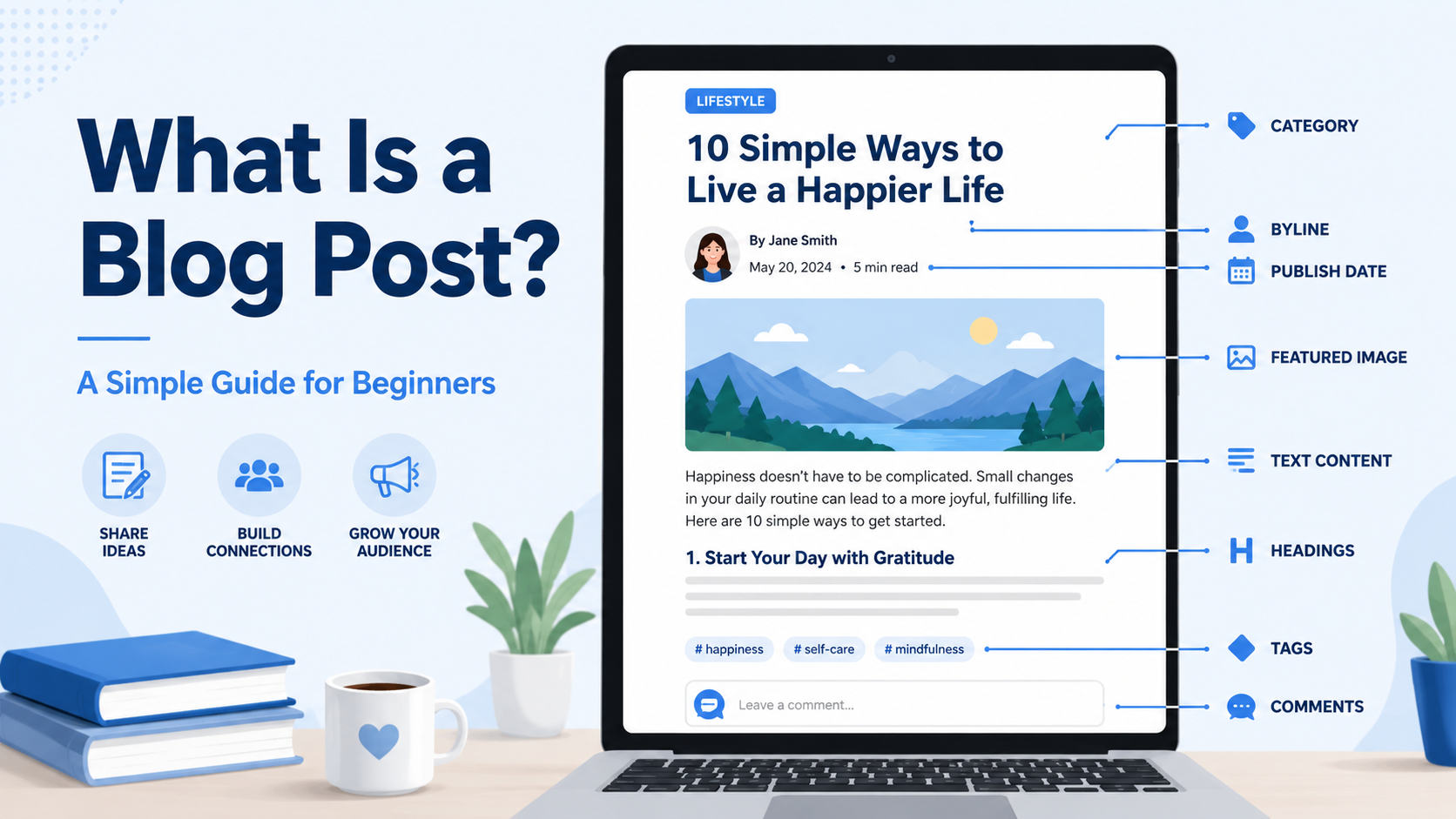
Typical elements of a blog post include:
Post title: Names the topic of the specific post.
Author or byline: Names the individual or organisation behind the content.
Publication or updated date: Indicates when the post was first published or later revised.
Category or topic: Links the post to related content.
Unique URL or permalink: Supplies a specific web address.
Introduction: Sets out the subject or question.
Headings and subheadings: Structure the main content.
Body content: Holds the information, explanation or argument.
Images, video or other media: Reinforce the subject where suitable.
Internal links: Tie the post to relevant pages within the same website.
External references: Guide readers to helpful supporting sources.
Call to action: Might point readers to another relevant resource or next step.
Not all blog posts contain every single element. Things like a publication date, author, or category can assist in identifying a post, yet its publishing context and role within the website matter more.
What Does a Blog Post Look Like?
Take, for instance, a gardening blog that releases a guide titled “How to Care for Indoor Plants: A Beginner’s Guide.”
The published page could show:
Author: Example Author
Published: 12 August 2026
Category: Indoor Gardening
URL: example.com/blog/how-to-care-for-indoor-plants/
Beneath this information, the post might include an introduction, followed by sections that address questions like:
How Often Should You Water Indoor Plants?
This section could explain watering requirements and signs of overwatering or underwatering.
How Much Light Do Indoor Plants Need?
This section could explain different lighting conditions and how requirements vary between plants.
What Soil Should You Use?
This section could address drainage as well as suitable potting mixes.
Images, references, and links to related gardening guides could complement the main content.
The key distinction is that the blog post is the entire published webpage. The paragraphs make up its body content, while elements like its title, author, date, URL, and media constitute other parts of the post.
Blog Post vs Webpage: What’s the Difference?
Every blog post is a webpage, but not every webpage is a blog post.
A webpage is any individual page available on a website. Homepages, About pages, contact pages, product pages, service pages and blog posts are all types of webpages.
A blog post differs because it is published as an individual entry within a blog or similar publishing system.
| Feature | Blog Post | Standard Website Page |
|---|---|---|
| Typical purpose | Inform, explain, educate, report or discuss | Present company, service, product or functional information |
| Publication date | Common | Often absent |
| Author/byline | Common | Often absent |
| Category/topic | Common | Less common |
| Blog/archive placement | Usually | Usually not |
| Individual URL | Yes | Yes |
| Examples | Guide, tutorial, review, opinion | About, Contact, Service, Pricing |
The distinction does not depend on word count. A detailed 3,000-word service page remains a service page, while a 600-word entry published within a blog can still be a blog post.
Common Types of Blog Posts
Blog posts can take various formats, depending on what they are meant to achieve:
How-to posts describe the steps needed to complete a task.
Informational posts provide answers to questions or clarify concepts.
List posts arrange information or recommendations in list form.
Comparison posts look at the differences among two or more options.
Reviews assess products, services, tools or experiences.
Case studies record a situation, an approach and the outcome.
Opinion posts express an author’s stance or point of view.
News and update posts share recent developments.
These formats can overlap. For example, a comparison post might also function as a buying guide.
Blog Post vs Article: What’s the Difference?
No single rule exists that neatly distinguishes a blog post from an article.
Historically, the word article has been tied to newspapers, magazines, journals, and similar publications, whereas blog post means a single entry posted on a blog.
In today’s online publishing, that line is far less distinct. A blog post backed by extensive research might work much like an article, and a digital publication may label its individual pieces articles even if they display traits typically linked to blog posts.
As a result, publishing context tends to be more helpful than tone or word count when telling the two apart.
How Do Blog Posts Help With SEO?
They also open up chances to link related information together through internal links. For instance, a guide about running shoes could point readers toward related details on shoe types, sizing, or relevant product categories.
Google’s Search documentation advises using a logical site structure and linking to important pages from other relevant pages. Descriptive internal anchor text can also assist users and Google in understanding the destination page.
Simply publishing blog posts does not ensure search visibility. The content must still be useful, relevant, and accessible to the audience it is meant for.
How to Create a Blog Post
Writing a blog post usually entails choosing a subject, knowing who the audience is, drafting the content, filling in the required publishing details, and then publishing it via a website’s CMS.
A specialized guide on how to write a blog post can address the entire writing process, from keyword research and search intent to content structure and optimization.
Frequently Asked Questions
How Long Should a Blog Post Be?
There is no single word count that applies to every blog post. The right length depends on the subject and how much detail is required to cover it adequately. Both a brief announcement and an in-depth tutorial can qualify as blog posts.
Are Blog Posts Always Written Content?
The main body of a blog post is typically made up of written content, though posts may also include photographs, illustrations, charts, audio, video, and interactive elements.
Does a Blog Post Need an Author and Publication Date?
Not always. Author and publication details are typical elements, yet their absence does not by itself indicate that a webpage is not a blog post.
Can a Blog Post Be Updated After Publication?
Yes. Blog posts are able to be modified after they are published if the information turns out to be inaccurate, incomplete, or outdated. A website can show both the date it was first published and a date reflecting a later update.
Can Anyone Publish a Blog Post?
Yes. Individuals, businesses, educational institutions, nonprofit organisations, media publishers and other organisations can publish blog posts. The expertise required to create trustworthy content depends on the subject.

Muqit is an author at Insiders Desk, creating simple and practical guides to online business and digital income. He writes about business models, digital tools, SEO, content creation, and monetization methods, with a focus on clear explanations, realistic expectations, and informed decision-making. His content is educational and does not promise guaranteed income or business results.
Leave a Reply